
The Complete Guide to Google Consent Mode v2: Implementation, Testing, and Troubleshooting
A comprehensive walkthrough of Google Consent Mode v2 implementation, covering the four key parameters (ad_storage, ad_user_data, ad_personalization, analytics_storage), Basic vs Advanced modes, common implementation errors (67% of setups have issues), and how to verify your implementation with Google Tag Assistant. Essential reading for anyone using Google Analytics or Google Ads with EU traffic.
Your Google Ads conversion tracking just stopped working for 40% of your traffic. Your GA4 data shows a mysterious drop in European sessions. Your remarketing audiences have flatlined. Sound familiar?
These are the telltale signs of a broken—or missing—Google Consent Mode v2 implementation. And if you're running any Google services on a website with EU visitors, you've needed this since March 2024.
Here's the uncomfortable truth: implementation is genuinely confusing. Between four consent parameters that sound nearly identical, a choice between "Basic" and "Advanced" modes that nobody properly explains, and technical timing requirements that are easy to botch, most implementations have problems.
This guide cuts through the confusion. We'll cover exactly what Consent Mode v2 does, how to implement it correctly, how to verify it's working, and how to fix the mistakes that plague most setups.
TL;DR
- Google Consent Mode v2 tells Google how to handle tracking based on user consent choices
- Four parameters:
ad_storage,analytics_storage,ad_user_data,ad_personalization - Basic mode = tags blocked until consent; Advanced mode = tags load but respect consent state
- Most common error: Setting default consent AFTER tags load (causes a race condition)
- Test with: Google Tag Assistant
What You'll Learn
- What the four consent parameters actually control
- The real differences between Basic and Advanced mode (and which to choose)
- Step-by-step implementation using a Consent Management Platform
- How to verify your implementation with Google Tag Assistant
- The six most common implementation mistakes—and their fixes
What is Google Consent Mode v2?
Google Consent Mode v2 is an API that communicates your visitors' consent choices to Google's tracking services—Analytics, Ads, and related products.
The flow works like this:
- Visitor lands on your site
- Your cookie banner appears
- They make a choice (accept, reject, or customize)
- Your CMP captures that choice and communicates it to Google via Consent Mode
- Google adjusts its tracking behavior accordingly
Why "v2"? The original Consent Mode had only two parameters. Version 2, mandatory since March 2024, added two advertising-specific parameters (ad_user_data and ad_personalization). Without these, your Google Ads remarketing and conversion tracking are broken for EU traffic—and Google has been suspending bidding capabilities for non-compliant accounts.
The Four Consent Parameters Explained
Consent Mode v2 uses four primary parameters. Here's what each actually controls:
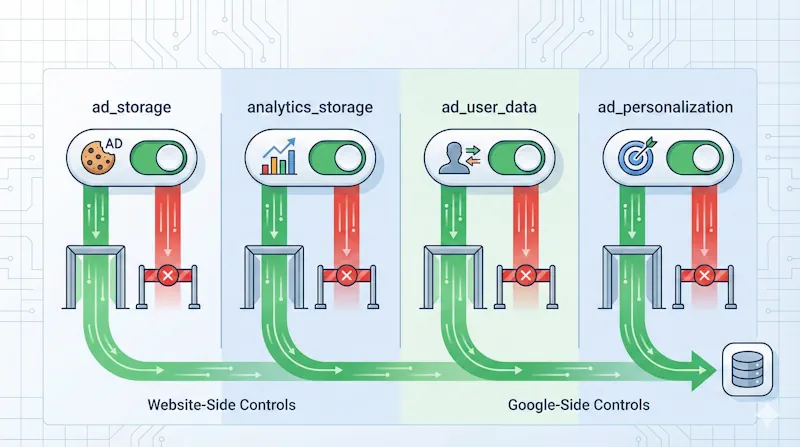
ad_storage
Controls whether advertising cookies can be stored on the user's device. When granted, Google Ads uses first-party cookies to measure ad effectiveness and build remarketing audiences.
When denied: No advertising cookies. Remarketing lists don't grow from these visitors.
analytics_storage
Controls whether Google Analytics cookies can be stored. This is your standard GA4 tracking consent.
When denied: No analytics cookies. In Advanced mode, anonymous cookieless pings still enable modeling.
ad_user_data (New in v2)
Controls whether user data can be sent to Google for advertising measurement. Directly affects conversion tracking and campaign optimization.
When denied: User data isn't transmitted for ad measurement—even if ad_storage is granted.
ad_personalization (New in v2)
Controls whether data can be used for personalized advertising and remarketing.
When denied: Data can't fuel personalized ads or remarketing, even if other consents are granted.
The Key Distinction Most People Miss
ad_storage and analytics_storage control what happens on your website (which cookies get set).
The newer ad_user_data and ad_personalization control what happens on Google's side (how they process and use the data).
This enables nuanced consent configurations: a user might allow conversion measurement (ad_user_data: granted) while declining remarketing (ad_personalization: denied). Your implementation must handle these combinations.
Basic vs. Advanced Mode: A Practical Decision Guide
This is where implementations frequently go wrong. People either pick randomly or assume "Advanced" must be better.
Basic Consent Mode
In Basic mode, Google tags don't load at all until a user interacts with your consent banner.
How it works:
- Tags are completely blocked before consent interaction
- If consent is denied, zero data goes to Google
- If consent is granted, tags load and function normally
Choose Basic if:
- Compliance is your top priority
- You want zero ambiguity about tracking non-consenting users
- Your legal team is cautious about cookieless pings
- You're willing to accept data gaps for cleaner compliance
The tradeoff: You lose all data from non-consenting visitors. Conversion modeling uses Google's general model (less accurate than advertiser-specific modeling).
Advanced Consent Mode
In Advanced mode, Google tags load immediately but operate in a restricted "denied" state until consent is granted.
How it works:
- Tags load with all consent states initially set to "denied"
- Cookieless pings (anonymous signals without identifiers) are sent even without consent
- When consent is granted, tags switch to full tracking mode
Choose Advanced if:
- You're heavily invested in Google Ads and need maximum conversion data
- You have sufficient volume (700+ ad clicks per 7 days) for modeling
- Your legal counsel is comfortable with cookieless pings
- Data recovery is a business priority
The tradeoff: Some privacy advocates consider cookieless pings a gray area under GDPR. You're sending some data before explicit consent, even if anonymous.
Our Recommendation
For most SMBs, Basic mode is the safer choice. It's legally clearer, simpler to implement correctly, and eliminates debate about whether cookieless pings constitute tracking.
Advanced mode makes sense for larger advertisers with significant Google Ads spend who need every optimization data point. But make this choice deliberately, not by default.
Cookient supports both modes through our built-in Google Consent Mode v2 integration—toggle which approach fits your compliance stance.
Step-by-Step Implementation
Three implementation paths exist:
- Using a certified CMP (recommended)
- Manual implementation via gtag.js
- Google Tag Manager with custom templates
We'll focus on the CMP approach—it's the most straightforward and least error-prone.
Step 1: Choose and Configure Your CMP
Your CMP must support Google Consent Mode v2 with all four parameters:
- ✅ Support for
ad_storage,analytics_storage,ad_user_data,ad_personalization - ✅ Ability to set default consent states
- ✅ Proper consent update firing when users make choices
- ✅ Ideally, Google CMP partner certification
With Cookient, Google Consent Mode v2 is built in—enable it in domain settings, choose your mode, and you're configured.
Step 2: Set Default Consent States (Critical!)
This is the most important step. Before any Google tags fire, you must establish default consent states.
For EU visitors, the typical default:
gtag('consent', 'default', {
  'ad_storage': 'denied',
  'ad_user_data': 'denied',
  'ad_personalization': 'denied',
  'analytics_storage': 'denied',
  'wait_for_update': 500
});
⚠️ Critical timing: This code must execute BEFORE your Google tags load. If tags fire first, you have a race condition that breaks everything.
Step 3: Fire Consent Updates
When a user interacts with your banner, update the consent state:
gtag('consent', 'update', {
  'ad_storage': 'granted',
  'ad_user_data': 'granted',
  'ad_personalization': 'granted',
  'analytics_storage': 'granted'
});
Your CMP handles this automatically based on user selections.
Step 4: Configure Regional Defaults
Different regions may need different defaults:
// Strict defaults for EU/EEA/UK
gtag('consent', 'default', {
  'ad_storage': 'denied',
  'ad_user_data': 'denied',
  'ad_personalization': 'denied',
  'analytics_storage': 'denied',
  'region': ['EU', 'EEA', 'GB']
});

// Permissive defaults elsewhere (if legally appropriate)
gtag('consent', 'default', {
  'ad_storage': 'granted',
  'ad_user_data': 'granted',
  'ad_personalization': 'granted',
  'analytics_storage': 'granted'
});
How to Verify Your Implementation
Broken implementations can go unnoticed for months, silently corrupting your data. Here's how to confirm everything works.
Using Google Tag Assistant
- Install the Tag Assistant Companion Chrome extension
- Navigate to tagassistant.google.com
- Add your domain and start a debugging session
Verification checklist:
| What to Check | Where to Look | Expected Result |
|---|---|---|
| Default consent state | First event → Consent tab | All 4 parameters showing expected defaults |
| Consent updates | After banner click → Consent event | Parameters updated to "granted" |
| Tag timing | Tags tab | Tags waiting for consent; none firing before defaults |
| Race conditions | Warnings panel | No "tag read consent before default" warning |
Verification in Google Ads
After 7+ days of implementation:
- Navigate to Goals → Conversions → Summary
- Click a website conversion action
- Open the Diagnostics tab
- Look for the green checkmark on consent mode status
Note: Conversion modeling requires ~700 ad clicks over 7 days per domain/country combination before activation.
The Six Most Common Implementation Mistakes
❌ Mistake 1: Default Consent Set Too Late
The problem: Google tags fire before default consent states are established.
Symptom: Tag Assistant warning: "a tag read consent before a default was set"
The fix: Place consent default code in <head> as the first script, before any Google tag code.
❌ Mistake 2: Missing v2 Parameters
The problem: Implementation only includes ad_storage and analytics_storage (v1 parameters), missing the v2 additions.
Symptom: Google Ads tags malfunction; remarketing breaks
The fix: Add ad_user_data and ad_personalization to both default and update commands.
❌ Mistake 3: Blocking Tags Instead of Denied State
The problem: In Advanced mode, tags are completely blocked rather than loaded in denied state.
Symptom: Empty consent tab in Tag Assistant; no modeling data
The fix: Tags must load and fire (with denied state) for cookieless pings to work. Don't block—deny.
❌ Mistake 4: Tag Firing Order Issues
The problem: Tracking tags fire before or simultaneously with the CMP tag.
Symptom: Inconsistent consent states; some events tracked without proper consent
The fix: In GTM, use "Consent Initialization – All pages" trigger only for your CMP tag.
❌ Mistake 5: No Consent Update Mechanism
The problem: Defaults are set, but consent never updates when users interact with the banner.
Symptom: All users tracked as "denied" even after accepting cookies
The fix: Verify your CMP fires the consent update command. Check Tag Assistant for consent events post-interaction.
❌ Mistake 6: Incorrect Regional Defaults
The problem: EU defaults applied globally, or vice versa.
Symptom: Non-EU visitors unnecessarily restricted; EU visitors not properly protected
The fix: Use regional defaults or geolocation-based banner display logic.
Ongoing Monitoring Checklist
Implementation is step one. Here's what to check regularly:
Weekly:
- Review Tag Assistant for new warnings
- Check conversion diagnostics in Google Ads
- Monitor consent rates in your CMP dashboard
Monthly:
- Verify modeling is active (after thresholds met)
- Compare consented vs. modeled conversion counts
- Review regional consent patterns
After any site changes:
- Re-test after GTM container updates
- Verify new tags are consent-aware
- Confirm banner still renders correctly
Wrapping Up
Google Consent Mode v2 isn't a compliance checkbox—it's the mechanism that keeps your measurement accurate while respecting user privacy. The difference between a correct implementation and a broken one can mean thousands of lost conversions in your reporting.
Get it right:
- Understand all four consent parameters
- Choose Basic or Advanced mode deliberately
- Set defaults BEFORE tags load
- Test thoroughly with Tag Assistant
- Monitor regularly for issues
If you want a CMP that handles this automatically, Cookient includes built-in Google Consent Mode v2 support. Our ~5KB script won't tank your Core Web Vitals, and setup takes minutes, not hours. No enterprise complexity—just proper compliance that works.
Questions about your consent implementation? Reach out at [email protected]