
Why 90% of Cookie Banners Don't Actually Block Tracking (And How to Tell If Yours Is One of Them)
Technical exposé revealing that most cookie consent implementations are 'compliance theater' - showing a banner while tracking continues unabated. Explains why basic script defer/async doesn't work, how Google Tag Manager bypasses naive blocking, and why MutationObserver + type='text/plain' is required for true compliance. Includes step-by-step verification guide using DevTools Network tab to test your own site, plus how Cookient's DOM-level interception ensures scripts never execute before consent.
You have a cookie banner. Users see it, click buttons, and everyone feels GDPR-compliant.
There's just one problem: the tracking never stopped.
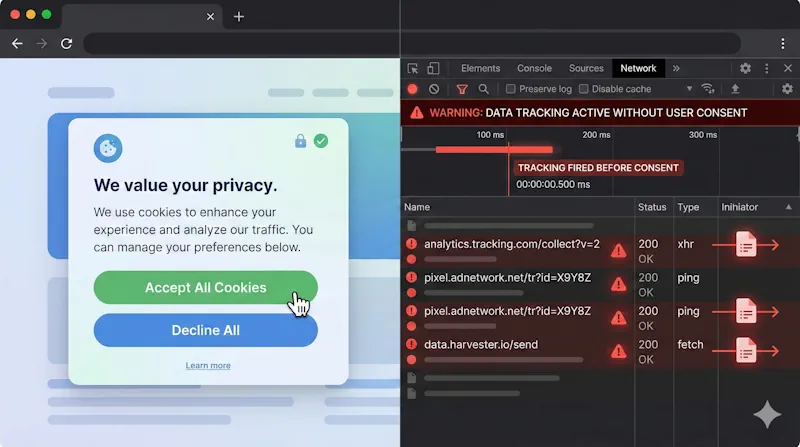
Here's a 60-second test: Open DevTools on your site. Navigate to the Network tab. Load a page without clicking anything on your cookie banner. If you see requests to google-analytics.com, facebook.net, or doubleclick.net before consent—your banner is compliance theater. A legal fig leaf providing zero actual privacy protection.
You're not alone. Independent audits consistently find that the vast majority of cookie consent implementations fail this basic test. They look compliant. They aren't.
TL;DR
- Most cookie banners are purely decorative—they display a consent UI while tracking continues unabated
- Basic implementation approaches fail because async scripts, defer attributes, and naive blocking don't prevent modern trackers from firing
- True script blocking requires DOM-level interception using techniques like MutationObserver or Firefox's
beforescriptexecuteevent - You can verify your own implementation in under 5 minutes using browser DevTools
- Regulators are catching on—pre-consent tracking was cited in SHEIN's €150M fine and other major GDPR penalties
The Legal Reality: What "Blocking" Actually Means Under GDPR
The legal requirement is unambiguous: under GDPR, cookies that process personal data from EU individuals can only be activated after the user gives explicit consent. The ePrivacy Directive reinforces this—storing or accessing information on a user's device requires prior consent, with narrow exceptions for strictly necessary cookies.
Pre-consent tracking is a violation. Period.
Yet compliance audits consistently show that most websites—including those with consent banners—set tracking cookies before users interact with any consent interface. How does this happen?
The answer lies in how consent management platforms actually work—or more accurately, how they fail to work.
Why Most Script "Blocking" Approaches Fail
The Async Loading Problem
Here's the typical "blocking" implementation that doesn't block anything:
<script async src="cookie-banner.js"></script>
<script async src="https://www.googletagmanager.com/gtag/js?id=GA-XXXXXX"></script>
The assumption: "I loaded my banner first, so it'll block the analytics script."
The reality: Both scripts load asynchronously. The browser fetches them in parallel. Google Tag Manager—optimized for fast delivery from Google's CDN—often wins the race. Your banner is still parsing when the first analytics beacon fires.
Result: Tracking happens before consent. Your banner is decoration.
The Defer Attribute Misconception
Some implementations try this approach:
<script src="cookie-banner.js"></script>
<script defer src="analytics.js"></script>
Better—defer ensures scripts execute in order after HTML parsing. But it fails for dynamically injected scripts, which is how most tag managers work. Google Tag Manager, once loaded, dynamically creates and injects additional scripts into your DOM. Your banner's "blocking" logic never sees them.
The TagManager Bypass
Modern tracking operates through tag management systems. A single GTM container can inject dozens of third-party scripts based on triggers—page views, scroll depth, clicks, form submissions.
Even if your CMP "blocks" the initial GTM script, once GTM loads (which it must for GTM-based consent implementations), it can inject whatever it wants. Race conditions are rampant.
Technical documentation from CMP vendors confirms these limitations: automatic blocking can only work if the CMP script is the very first thing in the website code. If any script loads above it, that content cannot be blocked. Modern browsers also preload third-party sources asynchronously, meaning tracking requests can fire while the blocking script is still loading.
The setTimeout Approach
Some CMPs try delaying tracking scripts:
setTimeout(function() {
  if (hasConsent('analytics')) {
    loadGoogleAnalytics();
  }
}, 1000);
This is compliance roulette. If consent evaluation takes longer than expected—slow network, heavy page, user hesitation—tracking might fire anyway. And from a regulatory perspective, any tracking before explicit consent is a violation, whether it happens in 1 second or 10 milliseconds.
The bottom line: Naive approaches don't work because tracking scripts are optimized to load fast, execute immediately, and resist being blocked.
What Real Script Blocking Actually Requires
True pre-consent script blocking requires intervention at the DOM level—intercepting and neutralizing scripts before they execute, not after.
The MutationObserver Approach
The technically correct solution uses MutationObserver, a browser API that watches for changes to the DOM tree. A proper implementation:
- Loads synchronously as the first script in
<head> - Creates a MutationObserver watching for script element additions
- Intercepts scripts matching blocked domains (google-analytics.com, facebook.net, hotjar.com, etc.)
- Changes their
typeattribute totext/plain(browsers ignore non-JavaScript types) - Stores the original source URL for later loading if consent is granted
- Re-enables scripts only after explicit user consent
This happens before scripts execute—not after they've already sent tracking beacons.
// Simplified concept - production implementations are more complex
const observer = new MutationObserver(mutations => {
  mutations.forEach(mutation => {
    mutation.addedNodes.forEach(node => {
      if (node.tagName === 'SCRIPT' && shouldBlock(node.src)) {
        node.type = 'text/plain'; // Prevents execution
        node.dataset.blockedSrc = node.src;
      }
    });
  });
});

observer.observe(document, { childList: true, subtree: true });
Firefox's Native Solution
Firefox provides a cleaner approach with the beforescriptexecute event, which fires immediately before any script runs:
document.addEventListener('beforescriptexecute', function(e) {
  if (shouldBlock(e.target.src)) {
    e.preventDefault();
  }
}, true);
More reliable than MutationObserver in Firefox, but unsupported in Chrome/Edge/Safari. Proper implementations need browser-specific code paths.
The iframe Challenge
Scripts aren't the only tracking vector. Embedded content—YouTube videos, Google Maps, social widgets—also set cookies and transmit data. True compliance requires blocking these iframes until consent, replacing them with placeholder UI explaining what's blocked and offering one-click consent.
Key insight: Real blocking is hard. It requires synchronous loading, DOM-level interception, browser-specific APIs, iframe handling, and careful attention to race conditions. Most CMPs cut corners.
How to Test Your Own Implementation in 5 Minutes
You don't need special tools to verify whether your banner actually blocks tracking. Five minutes in DevTools will tell you.
Step 1: Start With a Clean Slate
- Open an incognito/private window (no existing cookies)
- Open DevTools (F12 or right-click → Inspect)
- Navigate to the Network tab
- Check "Preserve log" so requests persist through navigations
- Optional: Filter by searching for "google", "facebook", or "analytics"
Step 2: Load Your Site—Do NOT Interact With the Banner
Navigate to your homepage. Leave the cookie banner alone.
Watch the Network tab. Look for requests to:
| Domain | What It Indicates |
|---|---|
google-analytics.com |
Google Analytics tracking |
googletagmanager.com |
GTM container (may be acceptable depending on setup) |
facebook.net / connect.facebook.com |
Facebook Pixel |
doubleclick.net |
Google advertising |
hotjar.com |
Session recording |
clarity.ms |
Microsoft Clarity |
ads.linkedin.com |
LinkedIn tracking |
snap.licdn.com |
LinkedIn Insight Tag |
analytics.tiktok.com |
TikTok Pixel |
Step 3: Check the Application Tab for Cookies
Switch to Application tab → Cookies in DevTools.
Before any consent interaction, you should only see:
- Session cookies (often
PHPSESSID,connect.sid, or similar) - Strictly necessary cookies for site functionality
- Your CMP's own consent storage cookie (that's fine)
You should NOT see:
_ga,_gid,_gat(Google Analytics)_fbp,_fbc(Facebook Pixel)_gcl_au,_gcl_aw(Google Ads)_hjid,_hjSession(Hotjar)- Any third-party tracking cookies
Step 4: Evaluate Your Results
If tracking requests fired before consent: Your banner is non-compliant. Period. It doesn't matter what happens after—the damage is done.
If cookies were set before consent: Same problem. GDPR violations occurred.
If everything was clean until you clicked "Accept": Your implementation might actually work. Now click "Reject" and verify tracking stays blocked.
Automated Testing Tools
For ongoing monitoring, consider:
- CookieYes cookie checker
- Cookiebot scanner
- 2GDPR.com for quick compliance checks
- ObservePoint for enterprise CMP auditing
These catch regressions when site changes inadvertently break your blocking implementation.
The Enforcement Reality: Regulators Are Testing This
This isn't theoretical risk. Regulators have technical capabilities to verify compliance at scale—and they're using them.
CNIL's SHEIN Enforcement (September 2025)
France's CNIL fined SHEIN €150 million. Among the findings: cookies were installed before users gave permission. The technical violation was straightforward—tracking fired pre-consent. The fine was anything but.
Google's €325 Million Fine
Also from CNIL in September 2025: Google was fined for showing promotional ads without prior consent and using consent designs that nudged users toward acceptance. The technical implementation didn't match legal requirements.
The ICO's Systematic Website Reviews
The UK Information Commissioner's Office conducted a review of the country's top 1,000 websites. They now have the technical ability—and regulatory mandate—to verify whether consent mechanisms actually function, not just whether banners exist.
The Cumulative Picture
Since GDPR enforcement began in 2018, fines have reached €5.88 billion across over 2,200 recorded penalties. Pre-consent tracking remains a top enforcement priority. The trend is clear: regulators aren't checking whether you have a banner. They're verifying whether blocking works.
Why CMPs Sell Broken Implementations
If proper blocking is technically possible, why do most CMPs sell implementations that fail?
The Performance vs. Compliance Tradeoff
Proper script blocking requires synchronous loading—your CMP must be the very first thing that runs, blocking all other scripts until consent is determined. This impacts performance.
Many CMPs prioritize minimal performance hit, loading asynchronously to avoid blocking the critical rendering path. Great for PageSpeed scores. Terrible for compliance.
The fundamental tension: asynchronous loading is faster but cannot guarantee scripts are blocked. Synchronous loading is slower but necessary for true blocking.
The Complexity Problem
Real implementations must handle:
- Dynamically injected scripts (GTM, ad networks)
- Inline scripts that set cookies
- iframes with embedded tracking
- localStorage and sessionStorage (also covered by ePrivacy)
- Scripts that execute immediately upon insertion
- Browser-specific APIs (MutationObserver vs. beforescriptexecute)
- Edge cases: cached scripts, service workers, preloaded resources
Most CMPs cut corners. They provide "blocking" that works in demos but fails in production.
The Liability Shift
CMP vendors structure their terms to place compliance liability on you. If their implementation doesn't actually block tracking, that's your problem—you should have verified it.
Read your CMP's documentation. Many explicitly state that automatic blocking has limitations and recommend manual implementation for "guaranteed" compliance.
What Actually Works: A Compliance Checklist
After this analysis, here's what a truly compliant implementation requires:
1. Synchronous First-Script Loading
Your CMP script must:
- Load synchronously in
<head>before any other scripts - Execute immediately, establishing blocking before anything else runs
- Not be loaded via TagManager (creates race conditions)
2. DOM-Level Interception
The implementation must use MutationObserver (or Firefox's beforescriptexecute) to:
- Watch for all script insertions in real-time
- Neutralize blocked scripts before execution
- Handle both static and dynamically injected scripts
3. iframe Blocking with Placeholders
Embedded content must be:
- Replaced with placeholder UI before consent
- Loaded only after explicit category consent
- Clearly labeled so users understand what's blocked
4. Active Storage Clearing on Revocation
When users revoke consent:
- Cookies must be actively deleted
- localStorage/sessionStorage must be cleared
- Tracking must stop immediately (not on next page load)
5. Regular Verification
Test that blocking works:
- After every CMS or platform update
- After adding new marketing or analytics tools
- After GTM container changes
- After CMP version updates
How Cookient Solves This Problem
We built Cookient's script blocking from the ground up to address these requirements:
MutationObserver + beforescriptexecute: Our ~5KB script uses MutationObserver for Chrome/Safari/Edge and Firefox's native beforescriptexecute event for Firefox. Scripts matching blocked domains are neutralized before they can execute.
iframe Blocking with Placeholders: We block embedded content (YouTube, Google Maps, social widgets) and display clear placeholder UI. One click grants category consent and loads the content.
Cookie Removal on Revocation: When users change preferences, we actively remove cookies and clear localStorage for blocked categories. Consent revocation isn't just recorded—it's enforced.
Synchronous Loading, Minimal Footprint: Our loader establishes blocking before any tracking can fire. Performance impact is minimized through aggressive optimization—5KB total vs. competitors' 200KB+.
Pre/Post Consent Analysis: Our dashboard shows which cookies exist before versus after consent, helping you identify compliance gaps in your implementation.
Conclusion: Test Your Site Today
The uncomfortable truth: most cookie banners are compliance theater. They provide legal decoration without privacy protection.
This isn't sustainable. Regulators are getting sophisticated. Fines are increasing. Technical verification is becoming standard practice.
The minimum standard for actual compliance:
- Zero tracking requests before consent interaction
- Zero cookies set before consent interaction
- Tracking stops immediately when consent is denied or revoked
- Implementation verified through DevTools testing
If your current implementation fails any of these tests, you have a liability, not a solution.
The good news: You can verify this yourself in five minutes. Open DevTools. Load your site. Don't click the banner. Look at the Network tab.
What you see will tell you whether you have real protection—or expensive decoration.
Need a cookie consent solution that actually blocks tracking? Cookient uses MutationObserver-based script blocking to ensure true pre-consent compliance. No tracking before consent. No complex enterprise features you don't need. Just working privacy protection.
Try it at cookient.app